Wednesday, July 26, 2017

D365 for Ops – Management Reporter ‘Generator’ Security Role

This MR security role is inherited via the assignment of ‘Accountant’, ‘CFO’ and ‘CEO’ security roles in D365.  The assigned D365 security Duty is ‘Generate financial reports’ and includes these privileges and menu items.


Not explicitly reflected in these security settings in D365 is that in MR, these settings allow the Generator user to update and save certain report parameters BUT those parameters are saved under a user-specific generation parameters for the report and do not alter parameters in the default report.  This is good in that the Generator user can edit parameters without affecting the default report but could be bad in that two users running the same report might get different results. 

The parameters that can be changed and saved by a Generator user are indicated in the red boxes.


However, the only Save option available to the Generator user is ‘Save My Report Overrides’ which saves User-specific generation parameters for the report.


The risk in assigning Generator rights to multiple users is the potential for different versions of the same report which reflect different financial results.  This risk might be outweighed by the need for certain users to generate their reports on demand.

Thursday, July 20, 2017

Beware the Penny Difference

If you're using Project Management & Accounting and Accounts Receivable in AX (D365 for Ops) and you have a Maximum penny difference and Maximum over/underpayment value set here in A/R Parameters>>Settlement -


Any Project invoice for an amount less than or equal to the Maximum over/under payment tolerance will transfer automatically to the general ledger account you have specified here -


When you post the Project invoice, it will post and offer this message -


And here are the journal vouchers created upon posting, indicating the write off from A/R account to the Rounding account.


Strange but true!

Friday, June 23, 2017

Posting Vendor invoices during Period close

Another filing in 'things learned along the way'.  In D365 for Operations, if the Purchasing module is On hold for the period and you try to post a vendor invoice with a date that falls in the On hold period, D365 gives you the option to post into the next open period.  I think that is a pretty cool feature.


Thursday, June 22, 2017

Importing Chart of Accounts with Exchange Rate Type field populated

I file this under 'things learned along the way'.  I just discovered this tonight when importing Main accounts into a GOLD environment with the 'Exchange rate type' field populated in the source file. There must exist at least one Exchange rate in the Exchange rate table for each Exchange rate type imported.


Without one Exchange rate setup, the DIXF job will throw this error for each record that has that Exchange rate type assigned to it.


Note that 'Foreign currency revaluation exchange rate type' = Exchange rate type in the Main account form.

Tuesday, November 29, 2016

Dynamics 365 for Ops - Customer Write-off Reason Codes

A new feature in Dynamics 365 is Customer Write-off Reason Codes, which allows you to specify write-off accounts by Reason code, effectively multiplying the number of write-off accounts you can configure in a legal entity.  Pretty cool, huh?

Credit and collections > Setup > Customer write-off reason codes


Thursday, August 11, 2016

Dynamics AX Number Sequence Gremlins

Sometimes number sequences do not advance as they should, especially when set to 'Continuous' under the General tab in Number Sequence setup.  I've seen this behavior with Journal Batch numbering more than any other number sequence type.  Here's how to resolve this quickly and easily if it occurs.

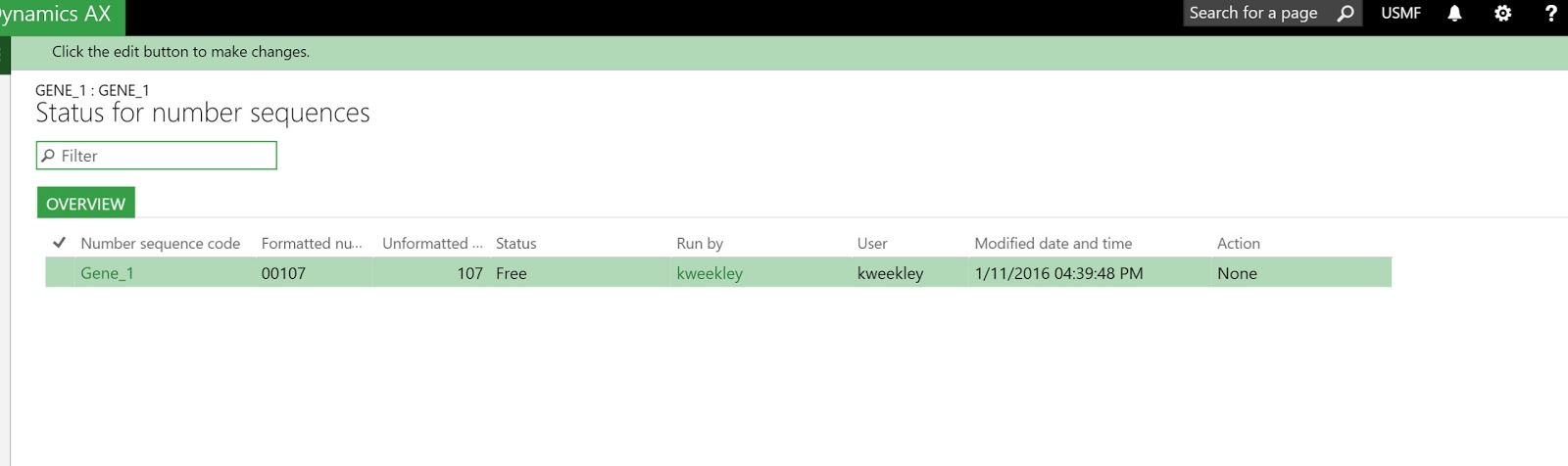
Navigate to Organization administration >> Number sequences >> Number sequences and select the offending Number sequence.  Then under Administration, select 'Status list'.  

Click image to enlarge

Delete any records that appear in this list.  No Edit or Delete button you say?  Not to fear - type Alt-F9 (the keyboard shortcut for Delete in AX).  Voila.  Problem solved.  Go back and try your journal again.


Wednesday, July 20, 2016

Microsoft Dynamics AX New Features: Workspaces

I'll be presenting a 30 minute webcast on July 27, 2016 at 12:30 PM EST on the new Workspaces in Dynamics AX.  Join us to learn how to use and customize Workspaces and gain some familiarity with the new AX user interface.  Click WORKSPACES to sign up.  Hope to see you there!